---
title: May 12, 2026 Release Notes
description: April 21, 2026 Release Notes
---
[Skip to content](https://www.hopdox.com/en/helpdox/may-12-2026-release-notes#main-content)
English
Show submenu for translations
[More support](https://www.hopdox.com/en/helpdox/kb-tickets/new?hsLang=en)
[![Hopdox-Logo-Color-No-Pad-1.png\]](https://www.hopdox.com/hs-fs/hubfs/Hopdox-Logo-Color-No-Pad-1.png?height=25&name=Hopdox-Logo-Color-No-Pad-1.png)](https://www.hopdox.com/en/helpdox?hsLang=en)
Open main navigation
Close main navigation
- English
Show submenu for translations
- [More support](https://www.hopdox.com/en/helpdox/kb-tickets/new)
Hello, how can we help you?
- There are no suggestions because the search field is empty.
1. [Hopdox Helpdox](https://www.hopdox.com/en/helpdox?hsLang=en)
2. [Release Notes](https://www.hopdox.com/en/helpdox/release-notes?hsLang=en)
# May 12, 2026 Release Notes
### ✅ Recently Added Counties
| **County** | **State** | **Date Added** |
| --- | --- | --- |
| Houston County | AL | 5/11/2026 |
| Brazoria County | TX | 5/8/2026 |
| Marion County | IL | 5/4/2026 |
| Kane County | IL | 5/1/2026 |
| Cooke County | TX | 4/29/2026 |
| Adair County | MO | 4/29/2026 |
| Cumberland County | ME | 4/29/2026 |
| Robertson County | TX | 4/29/2026 |
| Val Verde County | TX | 4/29/2026 |
| Dodge County | MN | 4/28/2026 |
| Belknap County | NH | 4/23/2026 |
| Columbia County | NY | 4/23/2026 |
| Sullivan County | NH | 4/23/2026 |
| Carroll County | NH | 4/23/2026 |
| Bristol South County | MA | 4/22/2026 |
See the full list of live counties here: [https://app.hopdox.com/erecord/recipients/info](https://app.hopdox.com/erecord/recipients/info)
---
### ✨ New Features & Improvements
#### Request a Recipient
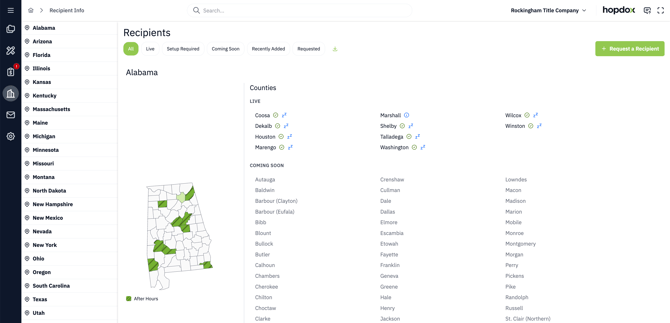
You can now request a new county recipient directly in Hopdox. Just go to the [Recipients page](https://app.hopdox.com/erecord/recipients/info) and click the **Request a Recipient** button in the top-right corner.

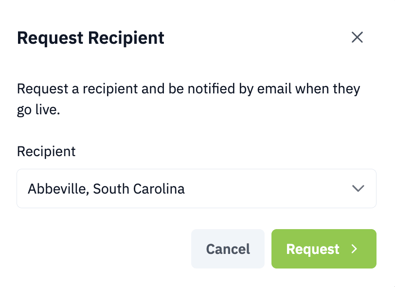
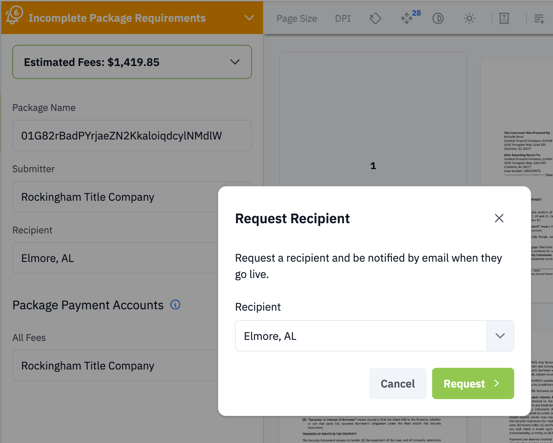
When you click the **Request a Recipient** button, a dialog opens where you can choose the county recipient you would like to request. After you submit your request, we will email you as soon as that recipient is live.
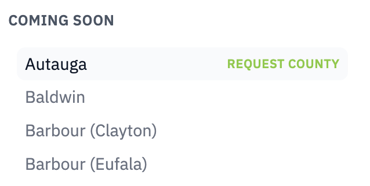
You can also request a recipient by clicking its name directly in the list, as shown below.
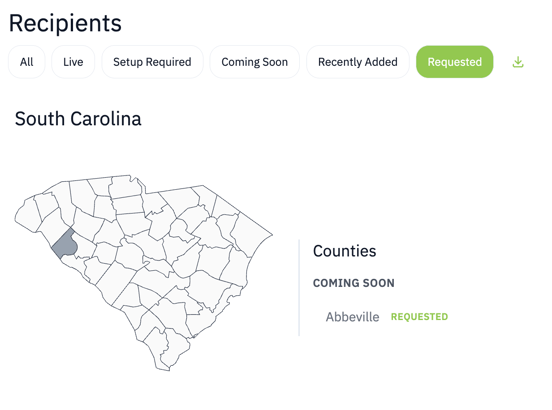
You can view only the recipients you have requested by selecting the **Requested** filter shown below.
Finally, when you create a package for a county that is not live yet, you will be prompted to request that recipient and opt in to be notified once it goes live.
---
#### Updates to the Document Selector
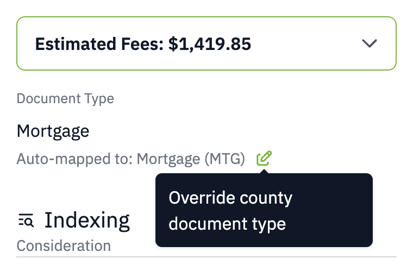
We have streamlined the process for manually updating document type mappings. If you need to change a document type, click the edit icon next to the auto-mapped document type, as shown below.
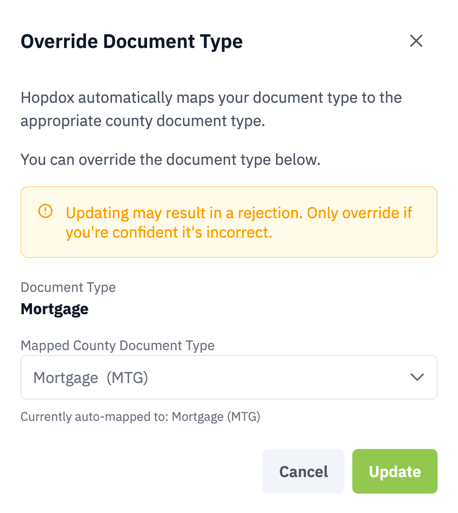
Clicking on the edit icon opens a dialog where you can manually change the document type.
---
- [Getting Started](https://www.hopdox.com/en/helpdox/getting-started?hsLang=en)
- [FAQs](https://www.hopdox.com/en/helpdox/faqs?hsLang=en)
- [Live Counties](https://www.hopdox.com/en/helpdox/live-counties?hsLang=en)
- [Release Notes](https://www.hopdox.com/en/helpdox/release-notes?hsLang=en)
- [Troubleshooting](https://www.hopdox.com/en/helpdox/troubleshooting?hsLang=en)
[](https://hopdox.com?hsLang=en)
© 2025 Hopdox. All rights reserved. [Privacy Policy](https://www.hopdox.com/privacy-policy?hsLang=en). [Terms of Use](https://www.hopdox.com/terms-of-use?hsLang=en).