---
title: February 19, 2026 Release Notes
description: November 4, 2025 Release Notes
---
[Skip to content](https://www.hopdox.com/en/helpdox/february-19-2026-release-notes#main-content)
English
Show submenu for translations
[More support](https://www.hopdox.com/en/helpdox/kb-tickets/new?hsLang=en)
[![Hopdox-Logo-Color-No-Pad-1.png\]](https://www.hopdox.com/hs-fs/hubfs/Hopdox-Logo-Color-No-Pad-1.png?height=25&name=Hopdox-Logo-Color-No-Pad-1.png)](https://www.hopdox.com/en/helpdox?hsLang=en)
Open main navigation
Close main navigation
- English
Show submenu for translations
- [More support](https://www.hopdox.com/en/helpdox/kb-tickets/new)
Hello, how can we help you?
- There are no suggestions because the search field is empty.
1. [Hopdox Helpdox](https://www.hopdox.com/en/helpdox?hsLang=en)
2. [Release Notes](https://www.hopdox.com/en/helpdox/release-notes?hsLang=en)
# February 19, 2026 Release Notes
### ✅ Recently Added Counties
| **County** | **State** | **Date Added** |
| --- | --- | --- |
| Bath County | VA | 2/17/2026 |
| Greene County | OH | 2/17/2026 |
| Bradford County | FL | 2/17/2026 |
| Mille Lacs County | MN | 2/17/2026 |
| Williamson County | TX | 2/12/2026 |
| Franklin County | NY | 2/10/2026 |
| Tompkins County | NY | 2/10/2026 |
| Iron County | MO | 2/10/2026 |
See the full list of live counties here: [https://app.hopdox.com/erecord/recipients/info](https://app.hopdox.com/erecord/recipients/info)
---
### ✨ New Features
#### Package info page enhancements
##### Add pages to a document
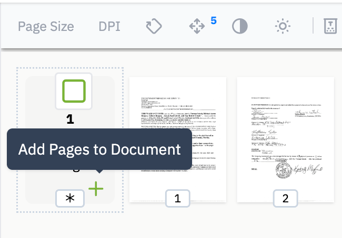
You can now add pages to an existing document directly from the thumbnail view. Click the “+” icon in the lower-right corner of the document header tile to open your browser’s file upload dialog, then select and upload the new page.
---
##### Expand Thumbnail Image
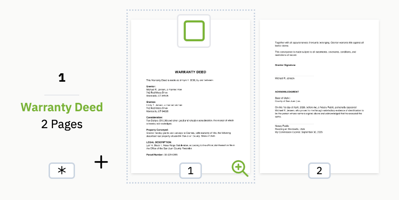
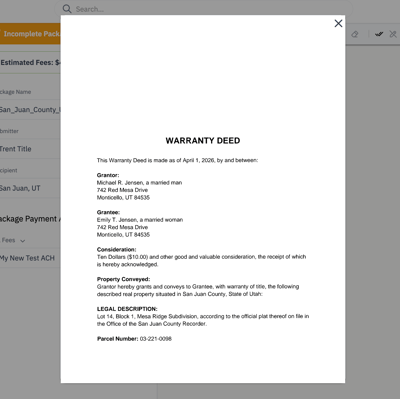
You can now enlarge a document thumbnail by clicking the zoom icon in the lower-right corner of the image.
##### 
---
##### Replace document pages
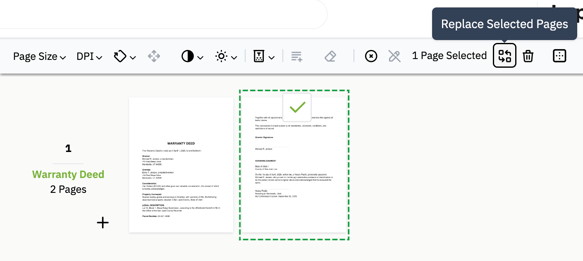
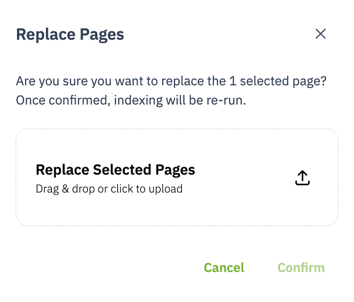
Document pages can be replaced from the thumbnail view by selecting the pages you want to replace, and clicking on the 'Replace Selected Pages' action in the toolbar. Doing so will open a confirmation dialog where you can upload the the file you want to use to replace the page(s) with.
---
#### Document type selector improvements
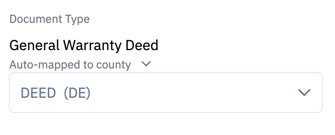
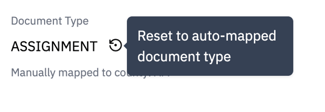
The document type selector has been improved for usability, with a clear indicator when an auto-mapped document has been manually changed and a one-click option to revert to the original auto-mapped document.
---
#### Quick submit action on the package list page
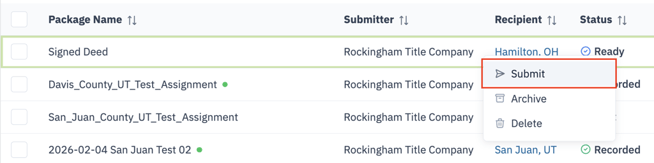
On the package list page, you can quickly submit any package that is marked as ready. To do this, either right-click the package row or open the three-dot menu and choose "Submit". After you click "Submit", a confirmation dialog will appear so you can review and confirm the details before sending the package to the county.
---
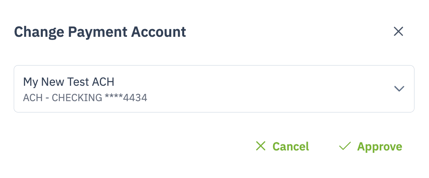
#### Update the payment account for due payments
You can now change the payment account for any eCheck payment that is due. You may switch it to any payment account you have already set up.

---
### 🐞 Fixes
- Resolved an issue that prevented St. Clair County from being auto-extracted.
- Resolved an issue where fee estimates did not refresh when the recipient was changed.
- Resolved an issue that caused mobile responsiveness to behave incorrectly on the Package Info page.
---
- [Getting Started](https://www.hopdox.com/en/helpdox/getting-started?hsLang=en)
- [FAQs](https://www.hopdox.com/en/helpdox/faqs?hsLang=en)
- [Live Counties](https://www.hopdox.com/en/helpdox/live-counties?hsLang=en)
- [Release Notes](https://www.hopdox.com/en/helpdox/release-notes?hsLang=en)
- [Troubleshooting](https://www.hopdox.com/en/helpdox/troubleshooting?hsLang=en)
[](https://hopdox.com?hsLang=en)
© 2025 Hopdox. All rights reserved. [Privacy Policy](https://www.hopdox.com/privacy-policy?hsLang=en). [Terms of Use](https://www.hopdox.com/terms-of-use?hsLang=en).