---
title: April 1, 2026 Release Notes
description: April 1, 2026 Release Notes
---
[Skip to content](https://www.hopdox.com/en/helpdox/april-1-2026-release-notes#main-content)
English
Show submenu for translations
[More support](https://www.hopdox.com/en/helpdox/kb-tickets/new?hsLang=en)
[![Hopdox-Logo-Color-No-Pad-1.png\]](https://www.hopdox.com/hs-fs/hubfs/Hopdox-Logo-Color-No-Pad-1.png?height=25&name=Hopdox-Logo-Color-No-Pad-1.png)](https://www.hopdox.com/en/helpdox?hsLang=en)
Open main navigation
Close main navigation
- English
Show submenu for translations
- [More support](https://www.hopdox.com/en/helpdox/kb-tickets/new)
Hello, how can we help you?
- There are no suggestions because the search field is empty.
1. [Hopdox Helpdox](https://www.hopdox.com/en/helpdox?hsLang=en)
2. [Release Notes](https://www.hopdox.com/en/helpdox/release-notes?hsLang=en)
# April 1, 2026 Release Notes
### ✅ Recently Added Counties
| **County** | **State** | **Date Added** |
| --- | --- | --- |
| Deschutes County | OR | 3/31/2026 |
| Lake County | OH | 3/30/2026 |
| Los Alamos County | NM | 3/26/2026 |
See the full list of live counties here: [https://app.hopdox.com/erecord/recipients/info](https://app.hopdox.com/erecord/recipients/info)
---
### ✨ New Features & Improvements
#### Bulk Page Positioning
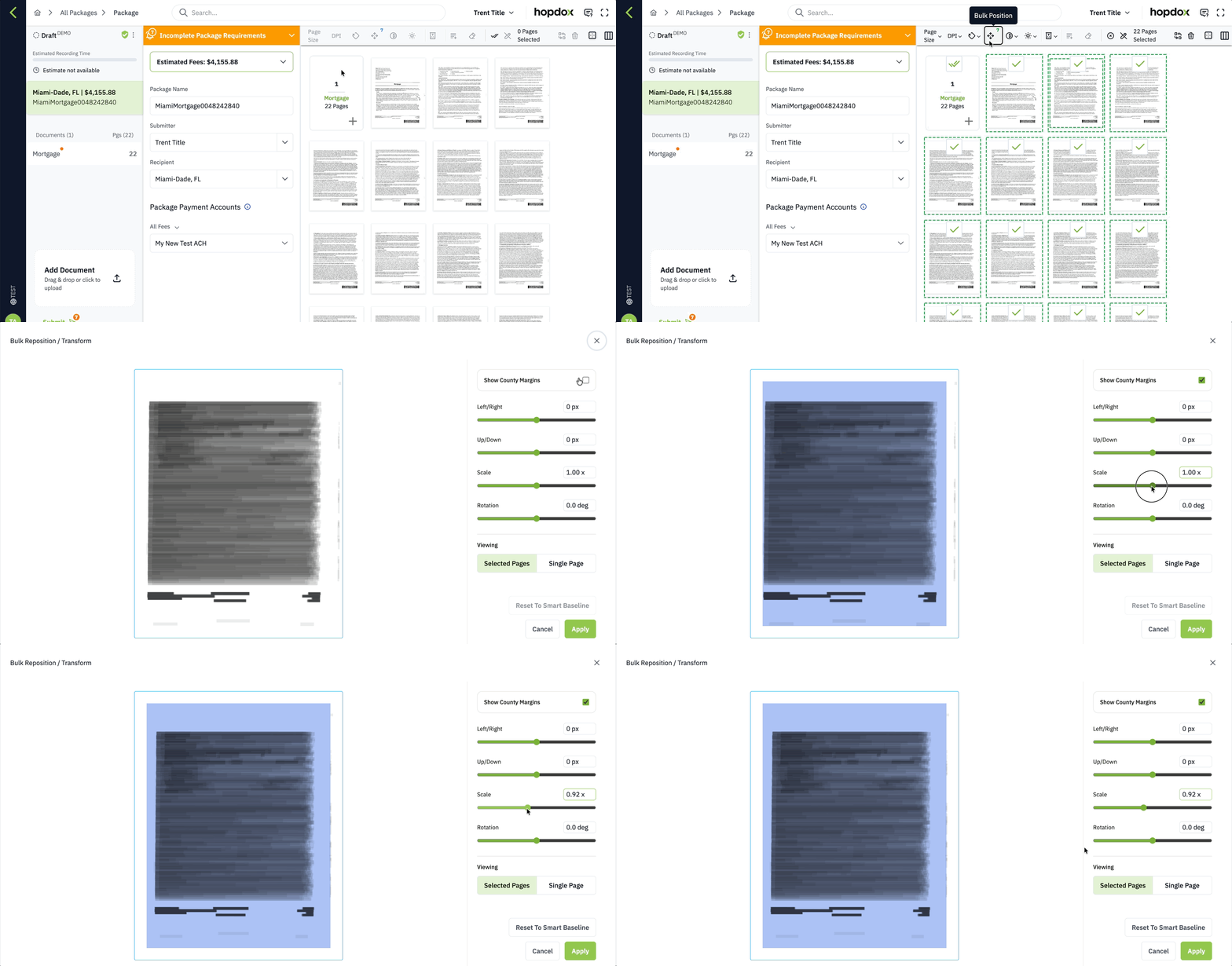
You can now position multiple pages at once directly from the package thumbnail view.
1. In the package thumbnail view, select the document or individual pages you want to reposition in bulk.
2. Click the **Bulk position** option in the toolbar.
3. Use the four position sliders to adjust the overlay for the selected pages, then apply your changes.
---
#### Dark Mode
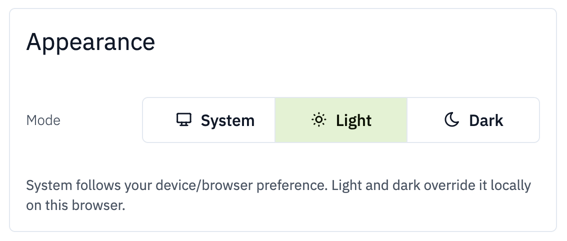
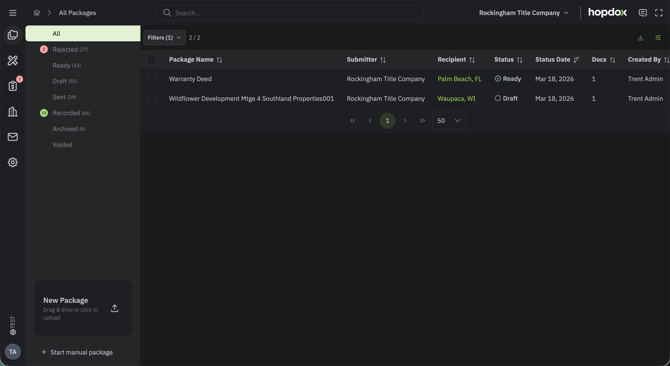
We have added a new Dark Mode theme for Hopdox that switches the interface to a darker appearance. You can turn Dark Mode on from the My Profile page (bottom-left user icon \> Profile \> Appearance).
You can also set the appearance to match your system settings so Hopdox will follow your device or browser’s light or dark mode preference.
#### 
---
#### Change Document Type
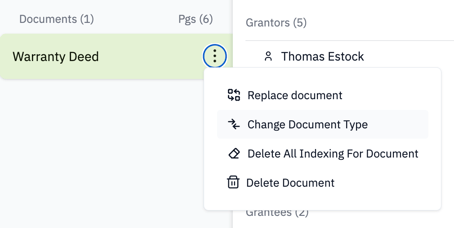
You can now change a document’s type directly from the document’s three-dot menu, as shown below.
- [Getting Started](https://www.hopdox.com/en/helpdox/getting-started?hsLang=en)
- [FAQs](https://www.hopdox.com/en/helpdox/faqs?hsLang=en)
- [Live Counties](https://www.hopdox.com/en/helpdox/live-counties?hsLang=en)
- [Release Notes](https://www.hopdox.com/en/helpdox/release-notes?hsLang=en)
- [Troubleshooting](https://www.hopdox.com/en/helpdox/troubleshooting?hsLang=en)
[](https://hopdox.com?hsLang=en)
© 2025 Hopdox. All rights reserved. [Privacy Policy](https://www.hopdox.com/privacy-policy?hsLang=en). [Terms of Use](https://www.hopdox.com/terms-of-use?hsLang=en).