---
title: July 8, 2026 Release Notes
description: July 8, 2026 Release Notes
---
[Skip to content](https://www.hopdox.com/en/helpdox/2026-07-08-release-notes#main-content)
English
Show submenu for translations
[More support](https://www.hopdox.com/en/helpdox/kb-tickets/new?hsLang=en)
[![Hopdox-Logo-Color-No-Pad-1.png\]](https://www.hopdox.com/hs-fs/hubfs/Hopdox-Logo-Color-No-Pad-1.png?height=25&name=Hopdox-Logo-Color-No-Pad-1.png)](https://www.hopdox.com/en/helpdox?hsLang=en)
Open main navigation
Close main navigation
- English
Show submenu for translations
- [More support](https://www.hopdox.com/en/helpdox/kb-tickets/new)
Hello, how can we help you?
- There are no suggestions because the search field is empty.
1. [Hopdox Helpdox](https://www.hopdox.com/en/helpdox?hsLang=en)
2. [Release Notes](https://www.hopdox.com/en/helpdox/release-notes?hsLang=en)
# July 8, 2026 Release Notes
### Recently Added Counties
| **County** | **State** | **Date Added** |
| --- | --- | --- |
| Macon County | IL | 7/7/2026 |
| Seminole County | FL | 7/2/2026 |
| Madison County | OH | 7/1/2026 |
| Saint Johns | FL | 7/1/2026 |
| Montgomery County | AL | 6/26/2026 |
| Green Lake County | WI | 6/26/2026 |
| Union County | FL | 6/25/2026 |
| Montgomery County | NY | 6/23/2026 |
| Mahnomen County | MN | 6/22/2026 |
| Walton County | FL | 6/22/2026 |
| Saint Lucie | FL | 6/18/2026 |
| Cleburne County | AL | 6/17/2026 |
See the full list of live counties here: [https://app.hopdox.com/erecord/recipients/info](https://app.hopdox.com/erecord/recipients/info)
---
### New Features & Improvements
#### Helper Document Updates
You can now upload and manage helper documents from both the left panel and the package details screen, making it simpler to handle all helper documents at the package level.
On the package screen, when helper documents are marked as required or optional, a dropzone for each helper document type will appear beneath the recordable document. In the example below, the Trustee Deed includes both a required and an optional helper document.
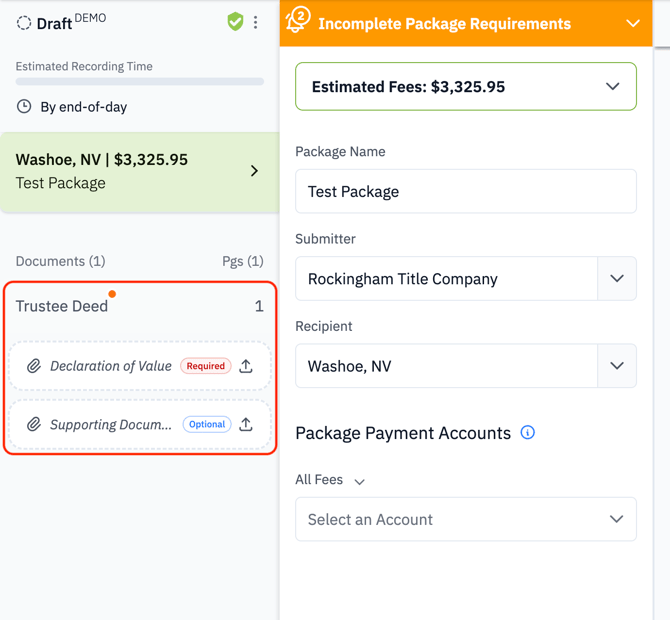
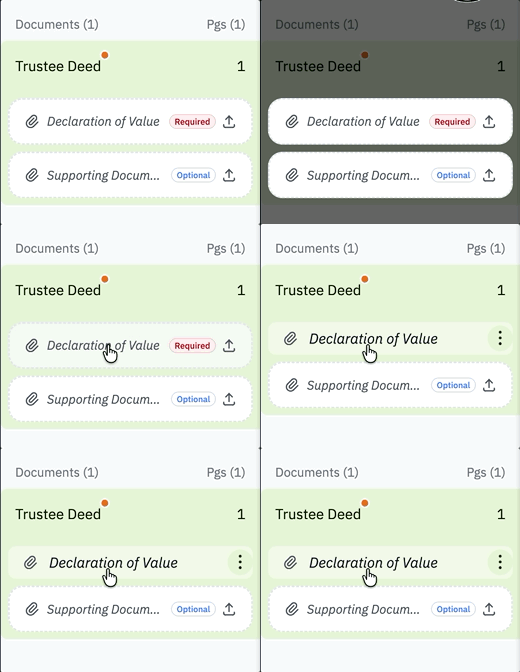
To add a helper document, either drag and drop the file into the dropzone or click the area to browse and upload, as shown below.
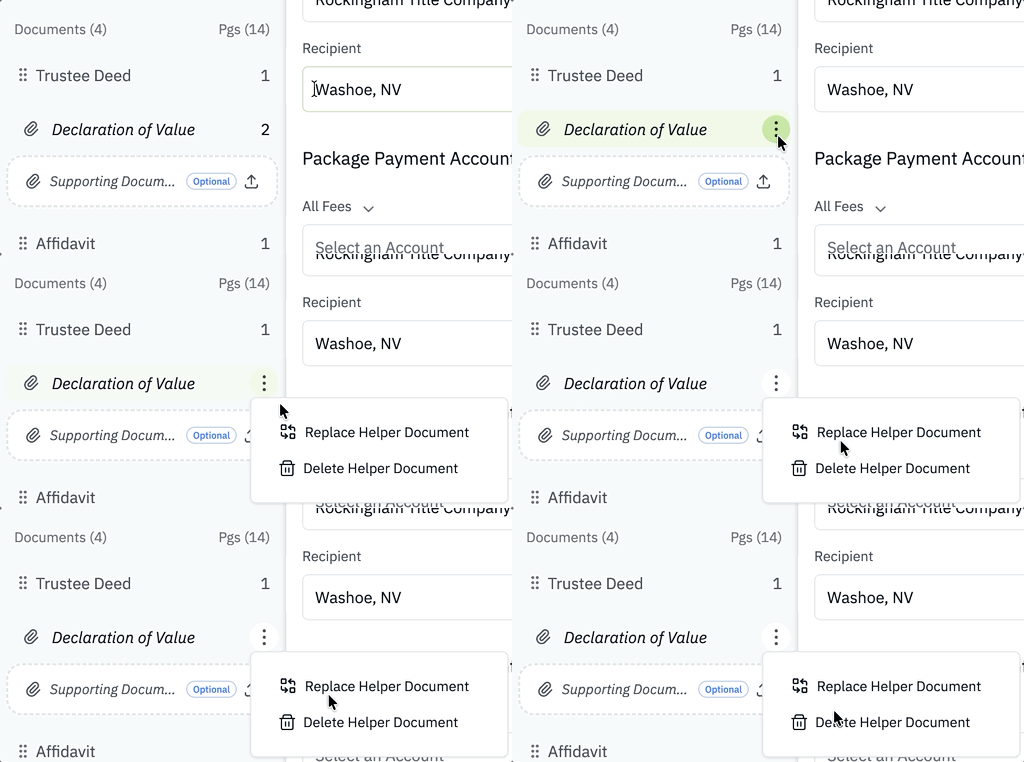
After a helper document is uploaded, you can replace or remove it at any time by selecting the three-dot menu next to the file, as shown below.
You can also manage helper documents from the package details screen. When a helper document is available, click the “+” icon to upload it, or drag and drop the file into that area.
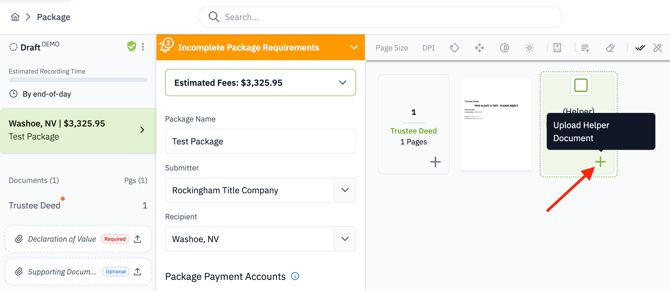
Here is an example of using drag and drop on the package details screen.

---
#### Indexing Updates
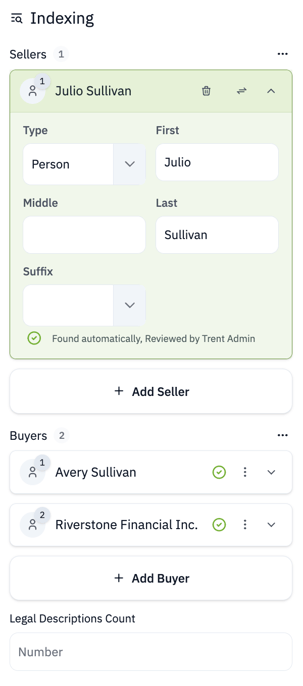
The indexing interface has been refreshed to make managing index values simpler and more intuitive. Highlights include:
- A quicker way to add new index values
- Expanded space so you can see more of each index value name
- Overall improvements to usability
---
#### Rejection Reason Updates
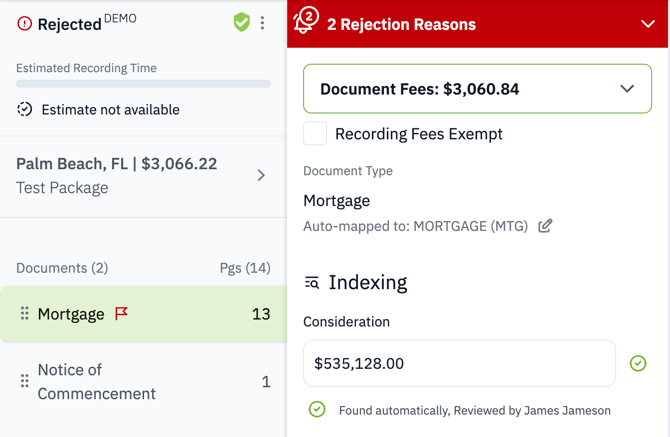
A rejection reason banner now appears on every document in a package. No matter which document you are viewing, you will see the relevant rejection reasons without needing to return to the package view, as shown below.
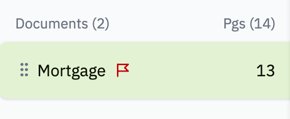
In addition, when an individual document is rejected, a red “Rejected” flag appears next to it in the left panel, as shown below.
---
#### New Context Menu on Page Thumbnails
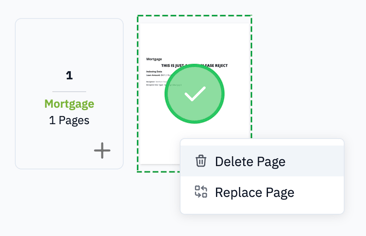
A new context menu is now available by right-clicking any page thumbnail. The current options include “Delete Page” and “Replace Page.”
---
### Fixes
- Fixed an issue with uploading bad PNG images
- Fixed an issue with not being able to upload multiple optional helper documents
- Fixed an issue where clicking on a package in the package list navigated users to the first document in the package instead of the package details screen
- Resolved an issue that prevented searching for packages containing dashes
- Fixed an issue with duplicate package detection not working
- General performance improvements
---
- [Getting Started](https://www.hopdox.com/en/helpdox/getting-started?hsLang=en)
- [FAQs](https://www.hopdox.com/en/helpdox/faqs?hsLang=en)
- [Live Counties](https://www.hopdox.com/en/helpdox/live-counties?hsLang=en)
- [Release Notes](https://www.hopdox.com/en/helpdox/release-notes?hsLang=en)
- [Troubleshooting](https://www.hopdox.com/en/helpdox/troubleshooting?hsLang=en)
[](https://hopdox.com?hsLang=en)
© 2025 Hopdox. All rights reserved. [Privacy Policy](https://www.hopdox.com/privacy-policy?hsLang=en). [Terms of Use](https://www.hopdox.com/terms-of-use?hsLang=en).